
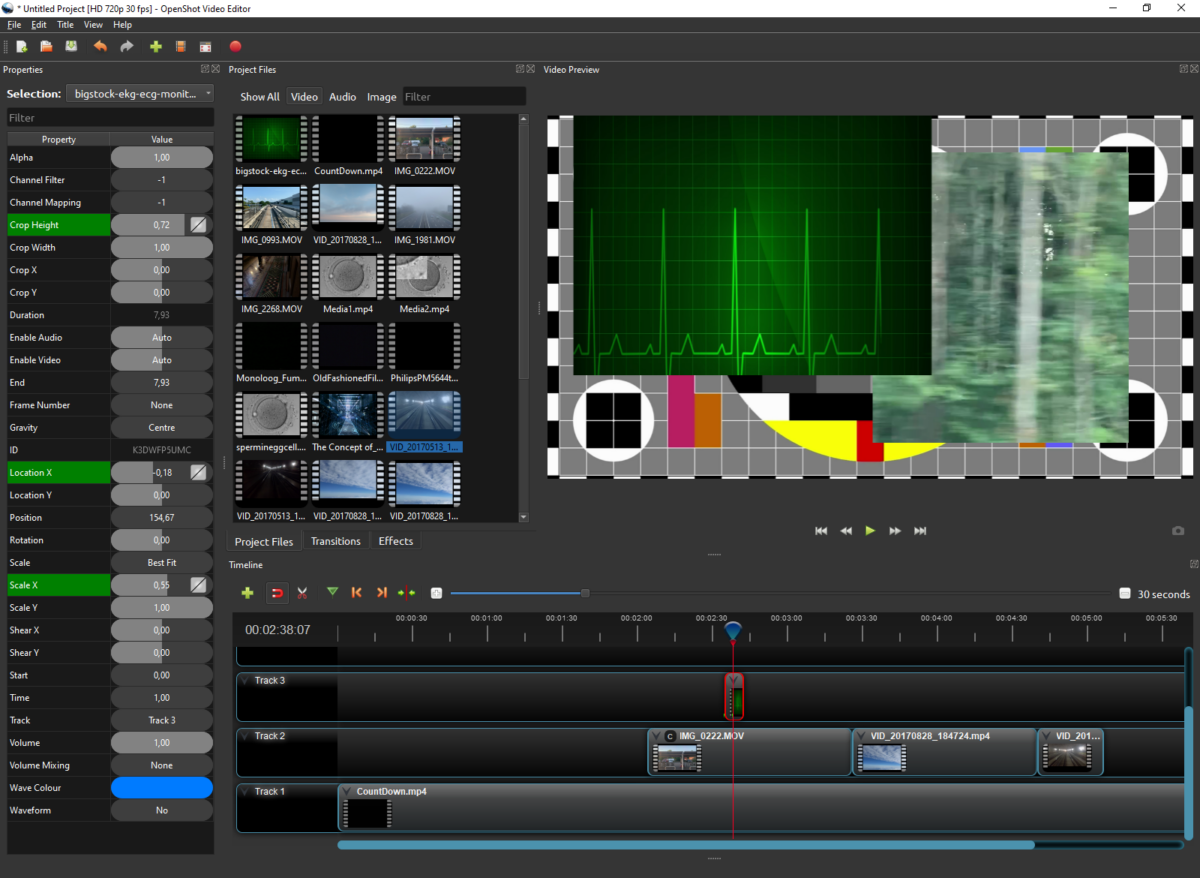
When you are looking for a basic and free solution for video
editing, free and open-source OpenShot may be a good compromise. It is easy
enough to learn, although not as intuitive as some more complex (but less free)
editors like Elements. The
interface is familiar for those that have already seen a non-linear editor
before but not too frightening for those on first acquaintances. The workflow
is also common to other software: media assets like video recordings, images,
sounds and music are imported in the project you work on. The clips are dropped
in the timeline in the bottom of the screen and monitored in the large preview
window top right. The properties of each asset or effect are accessed in a
clear and accessible bar on the left of the screen, where properties like
audio, size, duration etc. can be adjusted. Don ‘t expect too many or too fancy
effects or transitions, this remains a basic editor and anyway who needs all
these wild whirls and tumbles and filters anyway. Moreover. some
processes like effects or filters may stall or crash the software, so it takes
a little time to get used to what you can or better cannot do especially on your own hardware. Once finished you can easily export
your project in a preset format for Blu-Ray, DVD, file or web, and a great
number of format configurations is available: from AVI over mpeg 2 and 4 to
H264 and H265.
OpenShot Video Editor is available for Linux, OS X, and Windows. Free download on https://www.openshot.org