
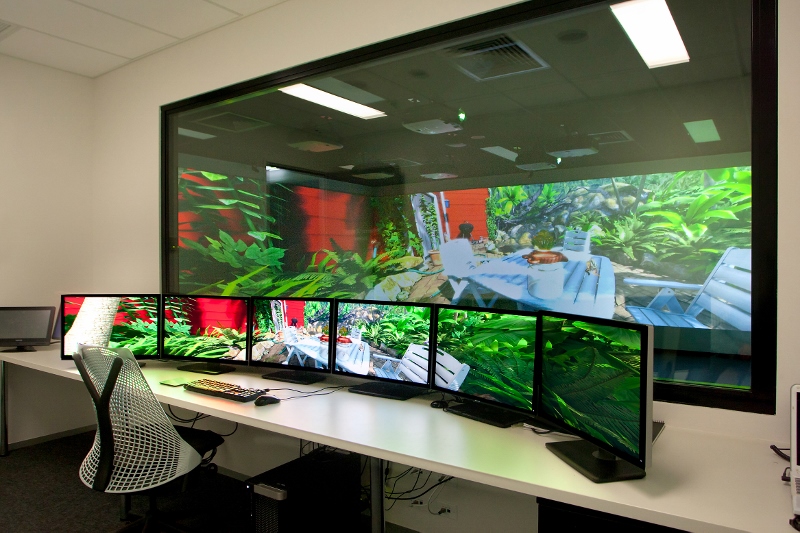
Western Sydney University (WSU) is the 11th largest University in Australia with over 40,000 students. Over the last 3 years they have been building a highly innovative, virtual learning environment for their paramedical students. We asked design leader, Peter Coman of InDesign to tell the story of how this space came about.
Peter – InDesign was invited to the project in late 2015 after representatives from Western Sydney University visited the University of the Sunshine Coast and experienced the immersive space that we created back in 2014. This immersive space was square; however Western Sydney University wanted a 360-degree circular environment. The objective for WSU was to
tcreate a cost-effective, immersive, virtual learning environment which will afford Paramedic students the freedom to make their own decisions and learn from their own failures, yet at the same time protecting them and others from danger by keeping them in a controlled situation.
We consulted extensively with the University about the various options available, detailing the complexity of creating a circular (versus square) space along with the associated costs; the University decided on the round space.
We provided a proposal for a 6 meter (diameter), customized solution including eight, high-brightness, Full HD, ultra-short-throw projectors, complete with immersive sound. The advantage of using the ultra-short throw projectors is that the projector can be located incredibly close to the screen. This allows people within the room to stand close to the screen without casting a shadow and the projectors shining directly into their eyes.
The first challenge that we faced was
trying to find someone to manufacture the 360-degree projection screen. We
contacted the local Australian manufacturer, but they believed that it would be
too difficult to manufacture. Searching for other options, I came across a
screen manufacturer at ISE 2017, who happened to have a curved screen on
display, and were able to provide a number of examples of curved projection
screens that they had previously created.
On returning to Australia, detailed
requirements were sent to the Spanish manufacturer, and we continued to work
closely with them for the next 5 months, further developing the design and
features. In June 2017, I flew to Spain to inspect the prototype screen and it
was exactly what we were after.
During the design process, we decided to
increase the size of the screen from 6 to 7 meters in diameter, to assist with
the projection image warping and blending.
The increase in size no longer allowed access behind the screen, so the
design was re-engineered to give access underneath the structure. Ongoing
consultation with the University lead to the addition of a circular bar at the
base of the screen to help protect it from any equipment accidently getting too
close, and causing costly rips and tears to the projection screen material.
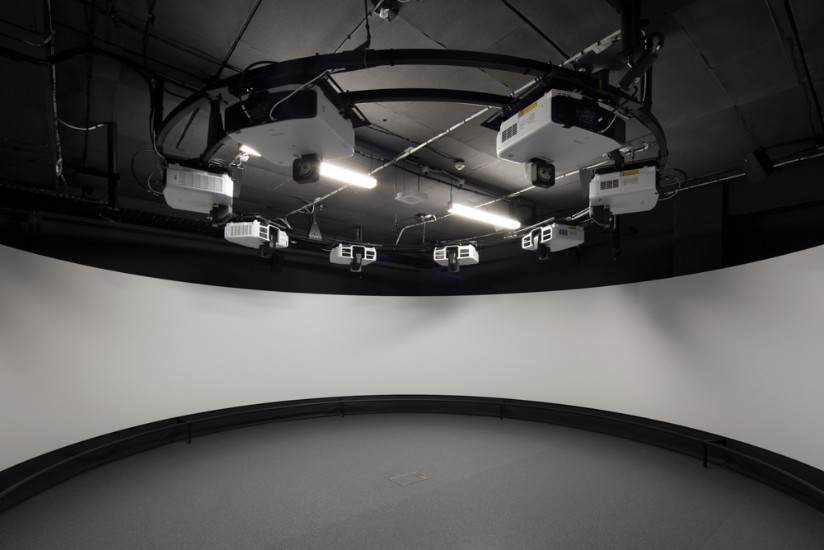
Once the screen design was complete,
attention was turned to the custom, 360-degree truss required to mount all
eight projectors evenly around the room. After calculating the required
projector throw distance, the truss and projector mounting brackets were designed
and manufactured locally in Sydney.
The final design aspect was the
acoustics. The walls and ceiling were
lined with acoustic foam to reduce and reverbing audio and maintain sound
quality.
Installation
– Next came the installation and configuration of
the space. In mid-December 2017, the
screen was air freighted from Spain to Sydney.
It took a further 4 weeks to install and configure the projectors and
audio, setup the software and load the content.
During this time, we worked closely with the University who was able to
easily create their own content with the use of costly specialised equipment.
The end result was amazing! Students are
now able to be transported into life-like, stressful, simulated, emergency
environments without the risk of danger or injury. The reality is that often
students learn best by making mistakes, however, making mistakes in a real
working environment will come with negative consequences and may then
negatively impact learning.
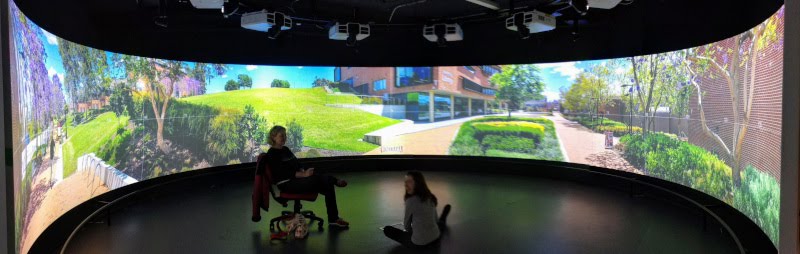
Technical
Specifications –
8 x Epson Full HD ultra-short throw
projectors, providing an overall image of 13,400 x 1,200 pixels, spanning a
width of 22 meters.
8 x Yamaha speakers (one per projector)
that provide an immersive, surround sound experience
4 x Panasonic Full HD cameras allow for
recording of the students via the B-Line Medical recorder, as well as providing
the control with a bird’s eye view of what’s happening in the space. The
cameras are connected to central Crestron 32×32 audio visual matrix that allow
the cameras to be viewed on any of the LCD screens within the building.
The room also has fixed 360-degree ceiling
microphone that provides the control room with quality two-way communication.
Adjacent to the 360-degree immersive space
is the control room, that houses the non-proprietary PC with an 8-output
graphics card that’s connected directly to each of the 8 x Epson ultra-short
throw projectors.
There are 8 x LCD monitors in the control
room (one per projector) that allows the operator to see exactly what’s on the
projectors.
A large LCD screen is mounted to the wall
that allows for the viewing of all four cameras all at the same time.
The control has a push-to-talk desktop
microphone, in-ceiling speakers, and headphones for two communication with the
immersive space.
There’s also an equipment room that houses
all of the larger equipment, including the Crestron 32×32 audio visual matrix,
the QSC Core 510 Digital Signal Processor, Yamaha amplifiers and the B-Line
Medical recorder.
Control of all of these spaces is provided by a
Crestron wireless touch screen and controller.

Author
Pete Coman
Managing Director |
RCDD, CTS, ESS, CDCDP, AssocIES, Dip.Tel.Eng, DMC-E, DMC-S, DM-NVX