by Sergiy Khrustal, University of Melbourne, Australia.
How can we support academic and professional staff in their mission to provide a world-class education? One way is to enhance communication and information capabilities with quality and reliable audio-visual facilities.
At the University of Melbourne, we manage and support more than 1,500 teaching and meeting spaces equipped with AV technology, spread across seven campuses and over 270 buildings. At this scale, an obvious question and a constant challenge emerges:
How do we ensure a consistent, high-quality AV experience across all teaching and learning spaces and meeting rooms?
Revisitng our support framework
To tackle this, we revisited our support framework:
- Level 0: Proactive monitoring and user training
- Level 1: Service desk / phone support
- Level 2: In-person technical support
- Level 3: Subject matter experts
- Level 4: OEM support
The goal is to resolve as many faults at level 0, before anyone picks up the phone to call for help. A robust proactive monitoring system, paired with engaging, easy-to-access knowledge resources (like short videos and quick reference guides), means many simple technical or knowledge-based issues can be addressed before the AV system is even switched on. Users have an improved experience, and support staff are freed up from a stream of trivial faults.
The reality of AV support under pressures
In practice, calls to the service desk come at the worst possible time: moments before teaching or a meeting begins. Service desk staff are under pressure to find a quick resolution or escalate with as much detail as possible. Every escalation costs time and resources, and each delay directly impacts teaching, learning, and collaboration.
AV support has a steep learning curve; to diagnose and resolve faults effectively, you need both technical knowledge and context about the physical space and system design. Even with that expertise, it can be hard and time-consuming to quickly find the exact technical details or drawings you need.
If every layer of support is empowered with relevant, easy-to-access information, the number of escalations and the time to resolve faults can be reduced. What if the service desk staff member knew everything they needed to know about the physical space and the AV system you’re having issues with?
Designing a blueprint for unified information
We started by asking a simple question: what information might be useful when resolving an AV issue?
We collated a long list of data points and took note of how each was stored and accessed. This included:
- Descriptions of each AV system: campus, building, room number or name, technology type, installation date, last service date, notes, and key features like microphones, teaching computers or recording devices.
- Relevant documents: photos, as-built schematics, source code, and configuration files.
- Physical space information: data from Geographic Information Systems (GIS), Building Information Modeling (BIM), and space/asset management platforms.
- Remote support tools: remote control user interfaces, room cameras or video previews, networked power control, subnets and VLANs, and IP address management.
- Networked devices: monitoring data from AV devices on the network.
- Support history: historical and active support tickets.
Then we turned to the structure of this information and asked:
- Where can naming and document storage be standardised?
- What metadata can we apply to improve discoverability and linking between resources?
- How are different data sources related, and can those relationships be built or updated automatically?
- How can we make all of this accessible and searchable through a single interface?
These questions became the blueprint for our next step.
Bringing it together with Power Apps and SharePoint
We already maintained a SharePoint list containing information on all AV-enabled spaces, so that was a logical starting point. I decided to use Microsoft Power Apps as a “low code” interface layered on top of that data, because it integrates tightly with the Microsoft services we already rely on.
Here’s what we built:
- A Power Apps application that serves as the main interface to our rooms list. Support staff can search by building name or number, room name or number, and immediately see key information about that space.
- Photos, as-builts, and source code files stored in separate dedicated SharePoint document libraries. Using Power Automate, we automatically apply building and room metadata to any new documents. The Power App then surfaces any relevant files for that space without anyone needing to manually link them.
- A new SharePoint list for building information, capturing campus details, mapping links, and network subnets.
- Automatic links from each room to ServiceNow tickets, mapping services, and network subnet searches, generated automatically so staff don’t have to hunt through multiple systems.
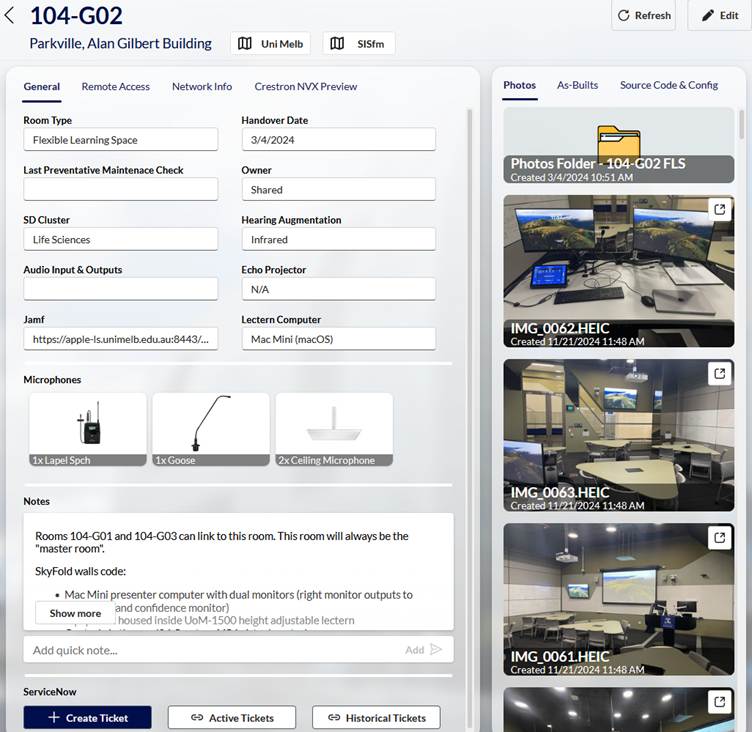
The result is a unified information interface, used by Level 1, 2, and 3 support teams. Even if a staff member has never stepped into a particular building, they can quickly see the system schematics, photos, documents, and support history for that room all from a secure web browser or mobile app. That context makes it far easier to diagnose issues quickly and confidently at the first point of contact.
What’s next?
Live audio visual device status is still an important missing piece of this puzzle.
We are using Cisco Splunk to ingest and aggregate audio visual device data from multiple AV monitoring platforms. Using this aggregated data we have implemented automatic ticketing based on device status, and are building out dashboards with a unified list of devices. My goal is to feed this aggregated device status data back into the Power App, so that support staff can see, in the same interface, a list of all networked AV devices in a room and their current status.
When that happens, our “single pane of glass” for AV spaces will include not just static information and documentation, but real-time device health as well. And that brings us closer to what we’re ultimately aiming for: supporting teaching an learning activities by providing exceptional service and support.

Sergiy Khrustal is an audiovisual engineer at the University of Melbourne, supporting the design and delivery of AV systems across the university’s teaching and learning spaces, and meeting spaces. With a Bachelor of Audio, he applies the same analytical mindset and technical expertise to solving complex audiovisual challenges and improving the reliability and usability of AV for staff and students.