by Nicolette Karst, Mid Sweden University, Sweden.
In this session on December 11, we enjoyed three presentations, with topics ranging from a more general to a highly specific take on AI an accessibility. The first presentation by Rina Fokel de Vries and Iain Johnston, University of Groningen (RUG), the Netherlands, showed (the making of) their e-learning course on accessibility. This was followed by Rachel Forsyth, Lund University, Sweden, who talked about how you can use GenAI to help create inclusive learning. Finally, Matt Deeprose, University of Southampton, UK, walked us through the creation of accessibility tools with the help of GenAI.
The Inclusive Teacher
This presentation offers a sneak preview of The Inclusive Teacher, a self-paced e-learning course with hands-on tools. Its aims are to promote awareness of diversity and inclusion in teaching, to help teachers build om their existing skills, and to show practical steps that can make a difference. In the process of making the content, both teachers and students were asked what they needed. D&I experts from RUG as well as special interest organisations were consulted, as was academic literature on inclusive teaching. The course won the 2025 Jury Prize for the ECIO (Expertisecentrum Inclusief Onderwijs) Inclusion Award.
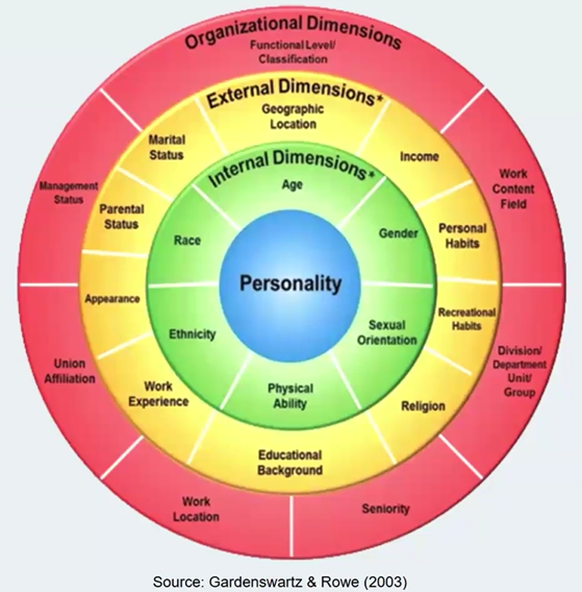
The Inclusive Teacher takes a multidimensional and intersectional approach (Gardenswartz & Rowe, 2003), and consists of five modules: Introduction, Inclusive course design, Inclusive pedagogy, Inclusive group work, and Inclusive assessment.
Inclusive course design aims to apply the principles of Universal Design for Learning (see https://udlguidelines.cast.org/), finding ways of diversifying the curriculum and making course materials more accessible.
Rina and Iain explained the importance of diversifying course materials. It concerns student representation and engagement; students feel more included when their group is represented in the curriculum. There is also the aspect of integrated knowledge and student employability; students will meet people from all kinds of different groups in their future work, so by developing their critical thinking and by learning what they need to know, they will be better prepared.
The Inclusive Teacher invites teachers to look at their own course materials through the prism of diversity to find out what they can or cannot do themselves to diversify their course. For example, including a diversity statement in the beginning of your course is a good start. So is asking your students what they need, what perspective they see is missing, or what they can help with. Also, talking to your colleagues to exchange tips regarding inclusive teaching is helpful.
The team also developed Digital accessibility, a guide containing general guidelines for digital content. The content stretches from layout, language, text structure, contextualising information, and hyperlinks to visuals and the use of colours, all to make digital content more inclusive for everyone.
Tip: For access to The Inclusive Teacher, request a guest account at inclusiveteacher@rug.nl
GenAI’s impact on inclusive learning
Rachel’s starting point was an overview of many reasons for which students can face a barrier to learning. We as teachers cannot attempt to remove all barriers, but to develop an inclusive community, we need to discuss issues of (in)equality and address them visibly. Students need to feel empowered to be themselves and to be in our classes.
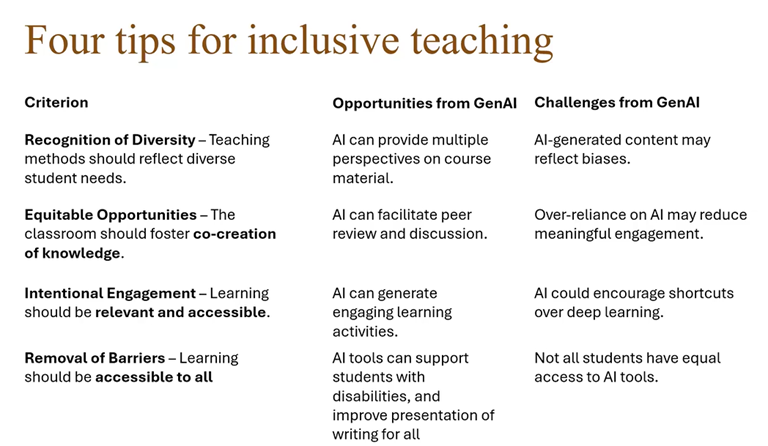
Four useful tips for inclusive teaching: 1. Recognise diversity by using teaching methods that reflect diverse student needs. 2. Equitable opportunities: the classroom should foster co-creation of knowledge. This works best when there’s trust between students and their teachers. 3. Learning should be relevant and accessible, so use intentional engagement. 4. By removing barriers to learning, one at the time, learning will be made accessible to all.
GenAI can be used to help you with these tips for inclusive teaching. However, you should be aware that the use of GenAI comes with challenges. Rachel lists the four teaching tips, the opportunities from GenAI, and its challenges:
Rachel invited us to reflect upon the following: Think of one way GenAI might help to make education inclusive in your context, and one concern you have.
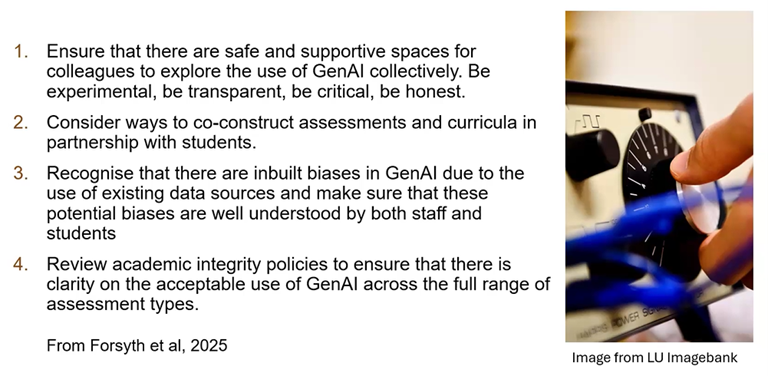
Rachel gave us some suggestions for cautious development:
Tip: Lund University’s free MOOC on GenAI in higher education, via Coursera:
Building digital accessibility tools with GenAI
Matt gave us an insight into the process of building digital tools to create more accessible educational resources, and into everything that process entails: prompting an LLM, describing the tool he wants, collaborating with GenAI (with Claude as the main LLM) to build it, following web accessibility guidelines, applying the university brand colour palette, and testing it with colour vision deficiency (CVD) simulation.
Matt showed examples of tools he has built with the help of AI, from simple tools to larger projects, covering different subject areas. In the end, he shared resources he has made to help us try for ourselves.
Two examples of small-scale projects
The first example was the SVG Palette Adjuster for Colour Vision Deficiency. This is a tool for teachers who create or use images in SVG (vector) format. With the tool, you can determine if someone with CVD may miss an important part of the image. Teachers can load an SVG file, preview it through a simulation of different types of CVD, identify the colours in the SVG file, swap them with colours from a CVD-friendly palette, and save the updated SVG file.
Another example of a tool Matt has built with AI was the CVD Image Tester, which shows what uploaded images look like for people with different types of CVD.
Examples of large-scale projects
One example of a large-scale tool Matt has been working on is the Image Describer, inspired by the Image Accessibility Checker tool at Arizona State University. This tool generates accessible alt text descriptions for uploaded images.
After showing some examples, Matt delved into the question of what types of projects and constraints are ideal for this use of AI. His advice:
- 1. Build on existing libraries and tools; know what good looks like
- 2. Know how to test for accessibility
- 3. Avoid projects that would require authentication or databases
- 4. Run from your computer or on free hosting
Tip: Take a look at Matt’s website to see more example tools he created using AI. Why not give it a try yourself?

Nicolette Karst, Mid Sweden University, Sweden